BEAUFORT, S.C. (Dec. 5, 2023) – If you want to report a damaged street sign in the City of Beaufort, we now have an app for that -- and for reporting many other service concerns!
Today the City of Beaufort introduces SeeClickFix, a tool that will allow residents to easily report various service issues to the appropriate staff in the City. “We look forward to integrating SeeClickFix into our daily operations,” said City Manager Scott Marshall. “We think citizens will be pleased with its ease of use and its responsiveness.”
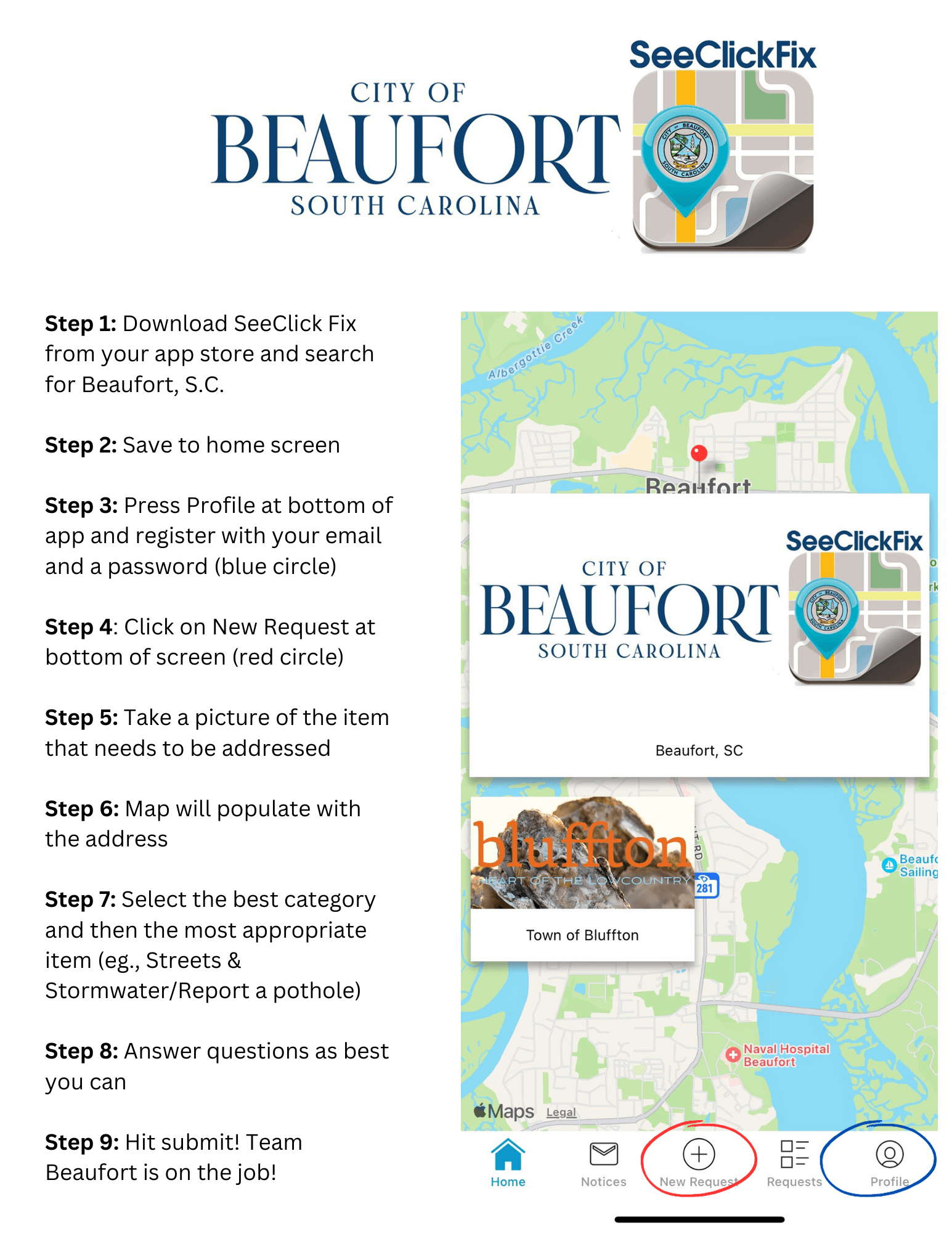
(See graphic at end for step-by-step instructions.)
You can download this app from the App Store on your phone. Once you have SeeClickFix downloaded and installed, search for Beaufort, S.C. Keep SeeClickFix somewhere on your phone where it is easy to find.
At the bottom of the app, you will see a profile icon. If you press that, you can register as a user of SeeClickFix Beaufort. We encourage you to register (this requires your email and a password that you set up). As a registered user, you can track the progress of your request, and see the status of other requests. However, if you would prefer not to register, you can submit issues as a guest.
Once you have registered, or decide to proceed as a guest, you simply press the plus at the bottom of the home screen, which says New Request. You can take a picture of the damaged street sign (or tap no picture – but we prefer you to send a photo if you can). Once you indicate you want to use that photo, a map of Beaufort will come up, with that location pinpointed. Hit next, and then you begin to fill out the request.
(Note: The map will also show an icon for the Town of Bluffton, which also has this app for its residents. That does not affect how it operates for Beaufort residents.)
You can also submit issues from our website (www.cityofbeaufort.org). A button on the website home page goes to the SeeClickFix page.
Currently, SeeClickFix has several categories, and issues under each category. These categories include:
- Streets & Stormwater Division
- Traffic Division
- Parks
- Solid Waste & Recycling
- Code Enforcement
Choose the category and issue that is closest to your concern. If you can’t find an exact match to fit the service need, please select “Other.”
Answer the questions that are prompted, and add any details that are pertinent. Hit submit. You will then get a reply acknowledging that the issue has been received and a ticket started.
On the back end of this app, the service request will be routed to the most appropriate office in the City for the need identified.
Once the work is completed, you will be automatically notified using the information provided in the service request.
Please let us know how this app is working once you start using it. Send any feedback to Communications Manager Kathleen Williams, kwilliams@cityofbeaufort.org.
######
Find us:
facebook.com/CityBeaufortSC
instagram.com/citybeaufortsc
cityofbeaufort.org